 P4 Software
/
logisticaHQ-en
P4 Software
/
logisticaHQ-en
When every check is fine, the Handheld shows:
Pallet [IQCTEST0002] passed QC. Put it away as usual.
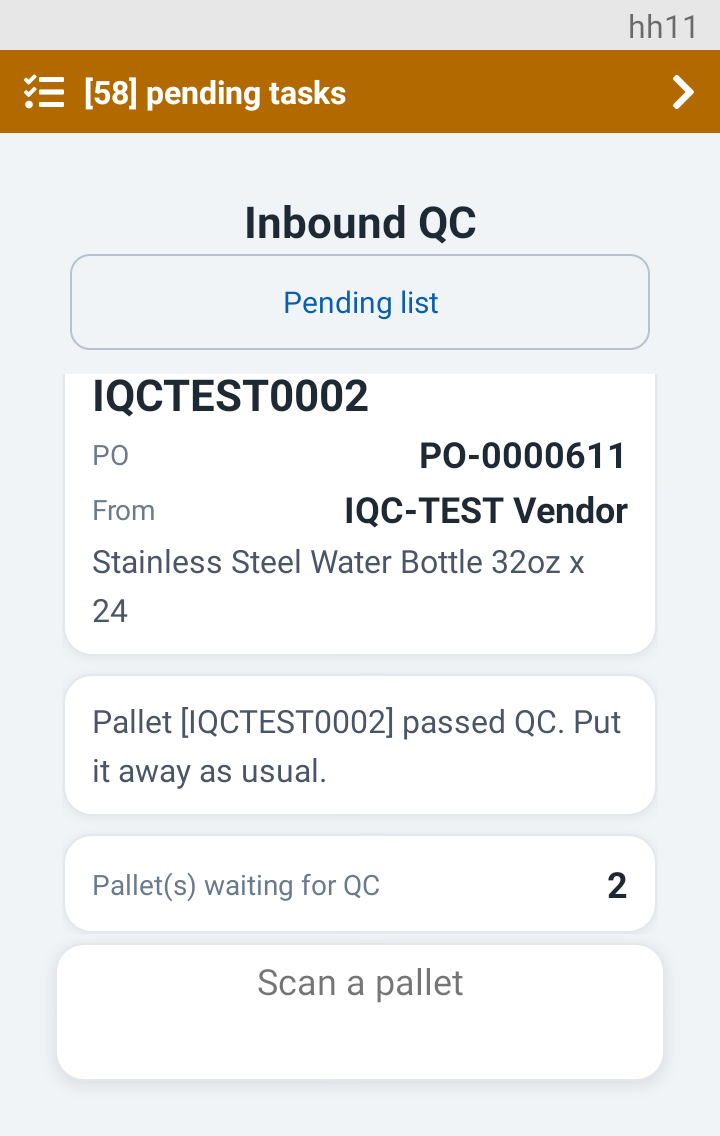
The Inbound QC screen has no putaway of its own. The pallet is now free for the ordinary putaway screens, so put it away as you always do. The Handheld goes back to Scan a pallet.
A pallet goes on hold when a check fails. Typical causes:
The Handheld shows Pallet [IQCTEST0002] on hold and then the reason in a red card. The first line is the hold reason your office wrote. The second line comes from the server and names the readings that failed. For example:
Only the positions that failed are listed.
After the reason, the Handheld asks for a quarantine location. It suggests one when it has room.
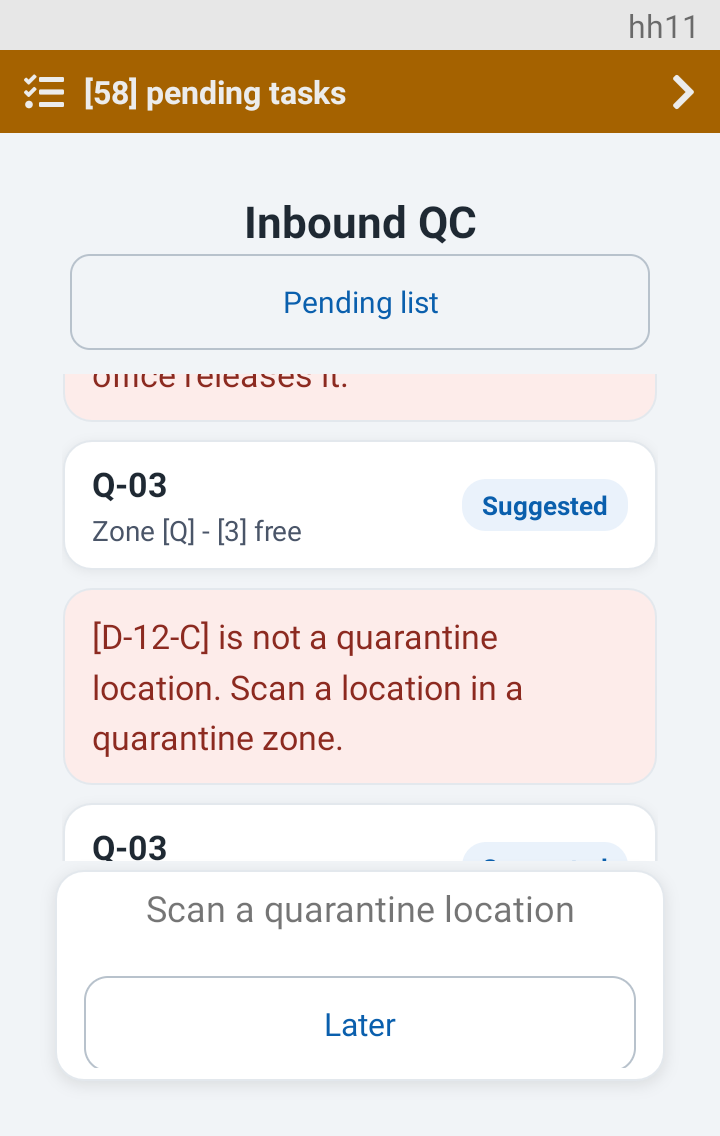
A red card says why. The Handheld reads the zone again, shows a fresh suggestion and asks for a new scan.
| Red card | What it means |
|---|---|
| [D-12-C] is not a quarantine location. Scan a location in a quarantine zone. | The location is not in a quarantine zone. |
| [Q-03] has no room. Scan another quarantine location. | The location is full. |
| [Q-03] cannot hold pallets. Scan another quarantine location. | The location does not take pallets. |
| Situation | What you see |
|---|---|
| A location has room | The suggestion card with Suggested, then the scan prompt and Later. |
| The quarantine zone is full | Zone [Q] - [0] free with no suggestion. The scan prompt and Later stay. A location that frees up is accepted. One that is still full is refused. |
| The Warehouse has no quarantine zone | The server's sentence says so, with only an OK button. The pallet stays on hold. Tell your supervisor. |
| The pallet is already in quarantine | Pallet [x] is in quarantine at [bin] and nothing more to do. |
| The office decided while you were scanning | A red card explains it and the Handheld Returns to Scan a pallet. There is nothing left to take to quarantine. |
If you cannot move the pallet now, tap Later. The Handheld says:
Pallet [IQCTEST0004] stays on hold. Take it to quarantine later.
The pallet is still on hold. When you are ready, scan its label on the Inbound QC screen. A short red card says the pallet is on hold, and then the quarantine prompt comes back. A held pallet that has not reached quarantine is not in the pending list, so scanning is the way back.
A supervisor decides on the web what happens to a held pallet. The supervisor can release it, reject it, or have it inspected again. When it is inspected again, the pallet card shows an Attempt row (2). Nothing is released or rejected from the Handheld.
Remember. Allocation, restock and counts skip quarantine locations, so a pallet that is already in quarantine cannot be picked. A pallet you left with Later is still where it stood, so take it to quarantine soon.
| Result | Message | What you do |
|---|---|---|
| Pass | Pallet [x] passed QC. Put it away as usual. | Put the pallet away on the ordinary putaway screen. |
| Hold | Pallet [x] on hold and the reason | Take the pallet to quarantine. |
| Quarantine done | Pallet [x] is in quarantine at [bin] | Nothing. A supervisor decides on the web. |
| Later | Pallet [x] stays on hold. Take it to quarantine later. | Scan the pallet again when you can move it. |
| Abandon | Pallet [x] handed back | The pallet Returns to the pending list. |
Go back to Handheld inbound QC or Inspecting a pallet.
Was this page helpful?