 P4 Software
/
logisticaHQ-en
P4 Software
/
logisticaHQ-en
An expiry-controlled product records an expiry date on every receipt. LogisticaHQ keeps stock with different expiry dates apart, refuses deliveries that are too close to expiry, never allocates stock that would expire too soon for the customer, and can pick the oldest stock first (FEFO: first expired, first out). Use it for food, pharmaceuticals, cosmetics, chemicals and anything with a shelf life.
This page explains how to configure a product with expiry dates, every field and setting involved, and what changes on the floor.
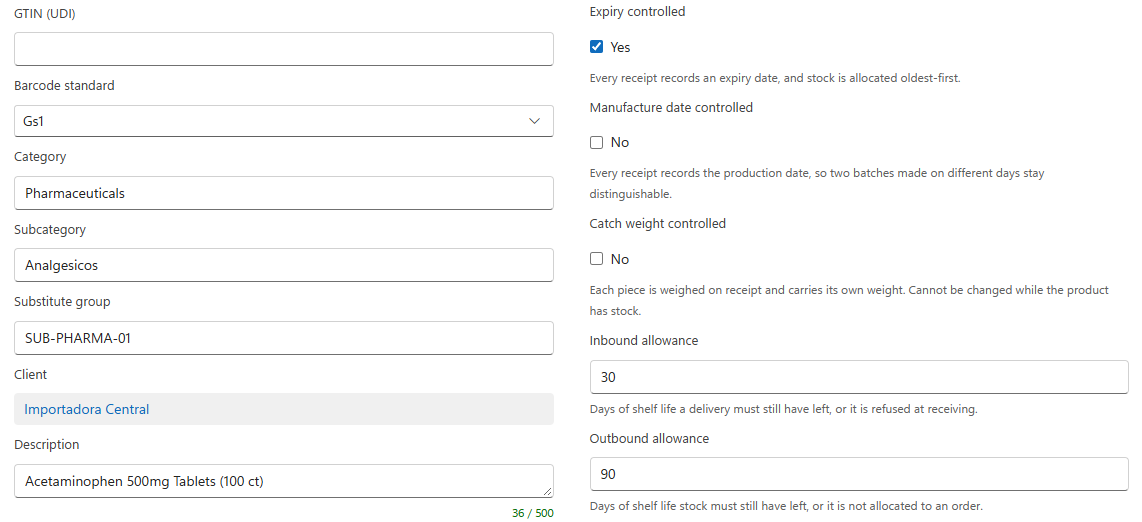
Expiry control cannot be changed while the product has stock ("Cannot change lot, serial, expiry, manufacture date, packsize, catch weight or unit of measure control while [SKU] has inventory..."), nor while it is on an open purchase order, pick ticket, production order or customer return ("Attribute control cannot be changed. Product has open transactions") unless Allow Attribute Change is on (Setup > System > Configuration, Business > Products; default No).
| Field | Values | Default | What it does |
| Expiry controlled | Yes / No | No | Every receipt records an expiry date. Stock with different dates is kept apart. |
| Inbound allowance | Days | Empty | Shown only when Expiry controlled is Yes. The days of shelf life a Delivery must still have left, or it is refused at Receiving. Empty uses the vendor's Expiry allowance, then the company setting. |
| Outbound allowance | Days | Empty | Shown only when Expiry controlled is Yes. The days of shelf life stock must still have left to be allocated to an order. Empty uses the customer's Outbound expiry allowance, then the company setting. |
The Handheld shows the expiry date that was allocated and asks the picker to scan or enter it. A different date is refused: "Invalid Expiry [scanned], [allocated] expected".
All in Setup > System > Configuration; only administrators can change them.
| Group | Setting | Default | What it does |
| Business > Products | Allow Expired Product | No | Allows Receiving and adjusting in stock that has already expired. |
| Business > Products | Expiry Format | yyyyMMdd | The format of expiry dates. |
| Business > Products | Allow Attribute Change | No | Lets tracking choices change while the product is on open orders (never while it has stock). |
| Business > Receiving > Operations | Expiry Allowance | 0 | Days of shelf life a Delivery must have left. A vendor's Expiry allowance or the product's Inbound allowance replaces it. |
| Business > Returns > Operations | Expiry Allowance | 0 | The same for customer Returns. A customer's Inbound expiry allowance or the product's Inbound allowance replaces it. |
| Business > Fulfillment > Allocation | Expiry Allowance | 45 | Days of shelf life stock must have left to be allocated to an order. A customer's Outbound expiry allowance or the product's Outbound allowance replaces it. |
| Business > Fulfillment > Allocation | Expiry Allocation Precedence | NoPrecedence | NoPrecedence, OldestFirst (FEFO) or NewestFirst. |
| Business > Production > Allocation | Expiry Allowance / Expiry Allocation Precedence | 145 / OldestFirst | The same choices for Production orders. |
| Business > License Plates | Allow Multiple Expiries | No | Whether one license plate may hold several expiry dates. |
| Message or symptom | Cause | What to do |
| Cannot receive product. Product expiry allowance is [N] days | The Delivery expires sooner than the inbound allowance allows. | Refuse the Delivery, or lower the allowance on the product, the vendor or the company setting. |
| Cannot add expired product [SKU] | The date entered is already past. | Check the date; to accept expired stock, an administrator turns on Allow Expired Product. |
| An order is not allocated although stock is on hand | The stock is within the outbound allowance (default 45 days). | Check the expiry dates in Analytics > Inventory > Expiry, and the allowance on the product, the customer or the company setting. |
| Bin [bin] cannot contain product with multiple expiry dates | The bin already holds another date of the product. | Use another bin, or allow multiple expiries on the bin or its zone. |
| Invalid Expiry [x], [y] expected | The picker entered a different date than the one allocated. | Pick the stock with the allocated date. |
Was this page helpful?