 P4 Software
/
logisticaHQ-en
P4 Software
/
logisticaHQ-en
The search box at the top of every screen finds anything in LogisticaHQ from one place: a menu entry, a setting, or a record such as a product, an order or an invoice. Press Ctrl+K (Cmd+K on a Mac) from anywhere to jump to it, then start typing. Until you type, the box reads Search menus, settings, Products, orders, Invoices….
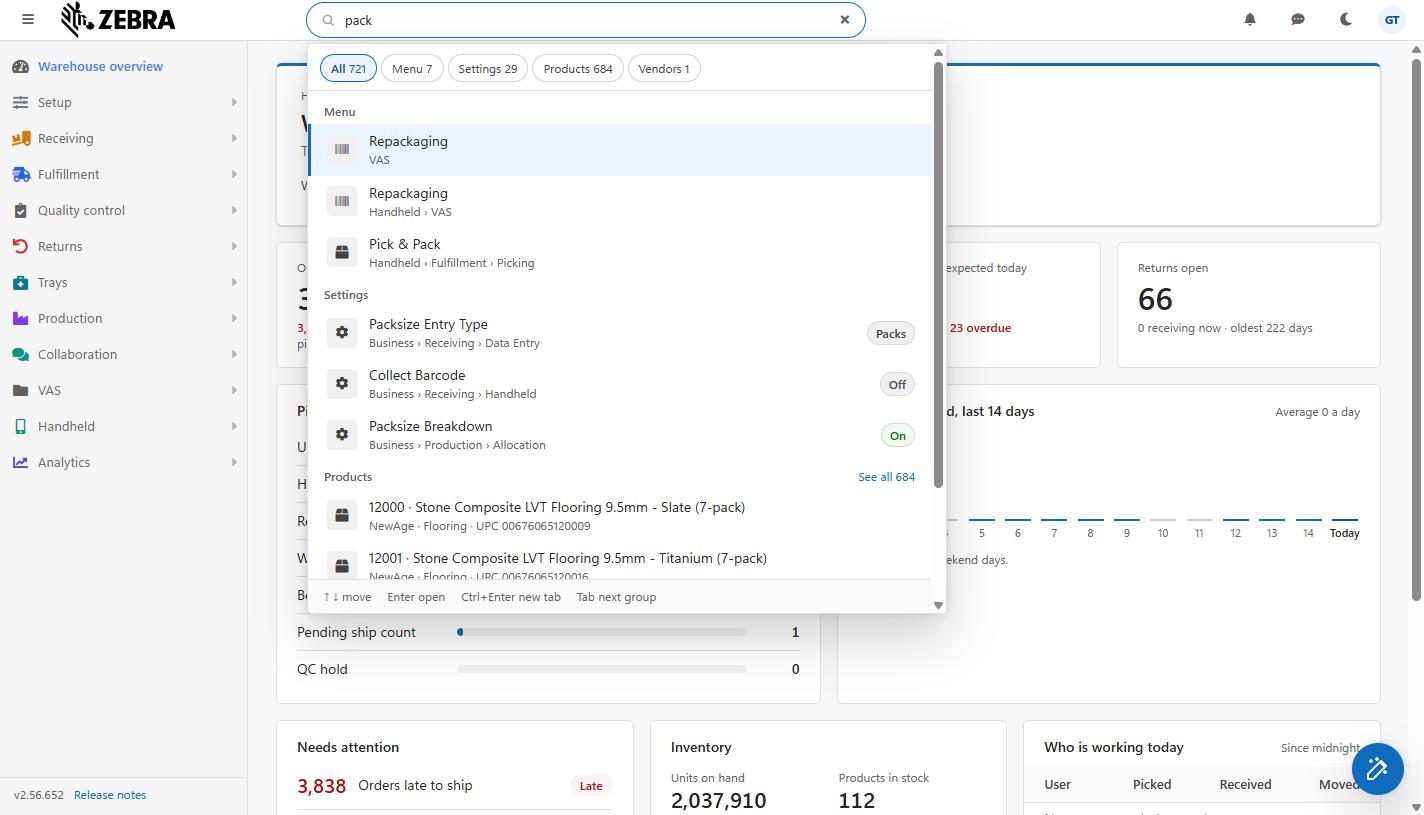
Ctrl+K search results for "pack", grouped by Menu, Settings and Products, with the group chips at the top.
Menu and settings are searched from the first character you type. You only see what you are allowed to open: if your role cannot open a kind of record, that group simply does not appear.
Administrators can find any setting with Ctrl+K and, for most settings, change it without leaving the screen they are on.
A setting matches when its name, its place, its explanation or its internal name holds every word you typed, in any order; capital letters do not matter. photos pack finds Include Photos On Packslip.
When a settings result is the highlighted one (with the arrow keys or by pointing at it), it opens up under its row:
| Kind of setting | Changed with |
| Yes / No | A switch, with its word beside it (On / Off, Required / Optional, Allowed / Not allowed) |
| Whole number or number | A number box, with its unit beside it |
| Text | A text box (spaces at the start and end are removed when saved) |
| Choice | A list; pick one entry |
The hints at the bottom of the panel change while a setting is highlighted: ↑ ↓ move · Tab change it · Enter save · Ctrl+Enter open in Configuration.
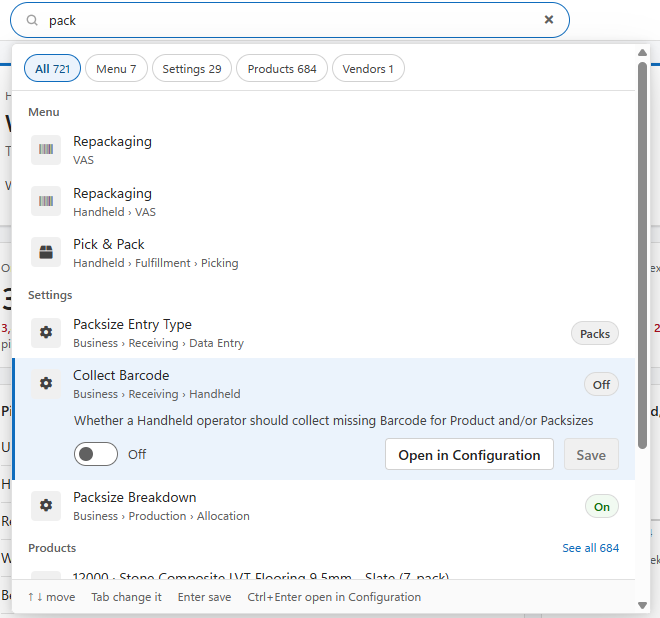
A highlighted settings result opened up: its explanation, the On / Off switch, Open in Configuration and Save, and the hints at the bottom of the panel.
With the mouse, change the value and click Save. While the cursor is inside the value, pointing at other rows does not move the highlight, so the setting you are changing stays open.
A saved setting takes effect for everyone at once, exactly as if it had been saved on the Configuration screen. If the save is refused, a message says why and your change stays in the box so you can try again.
Press Ctrl+Enter, or click Open in Configuration. Pressing Enter on a highlighted setting you have not changed does the same. Configuration opens in the same tab, on that setting:
See Configuration for the screen itself, including its own Find a setting box.
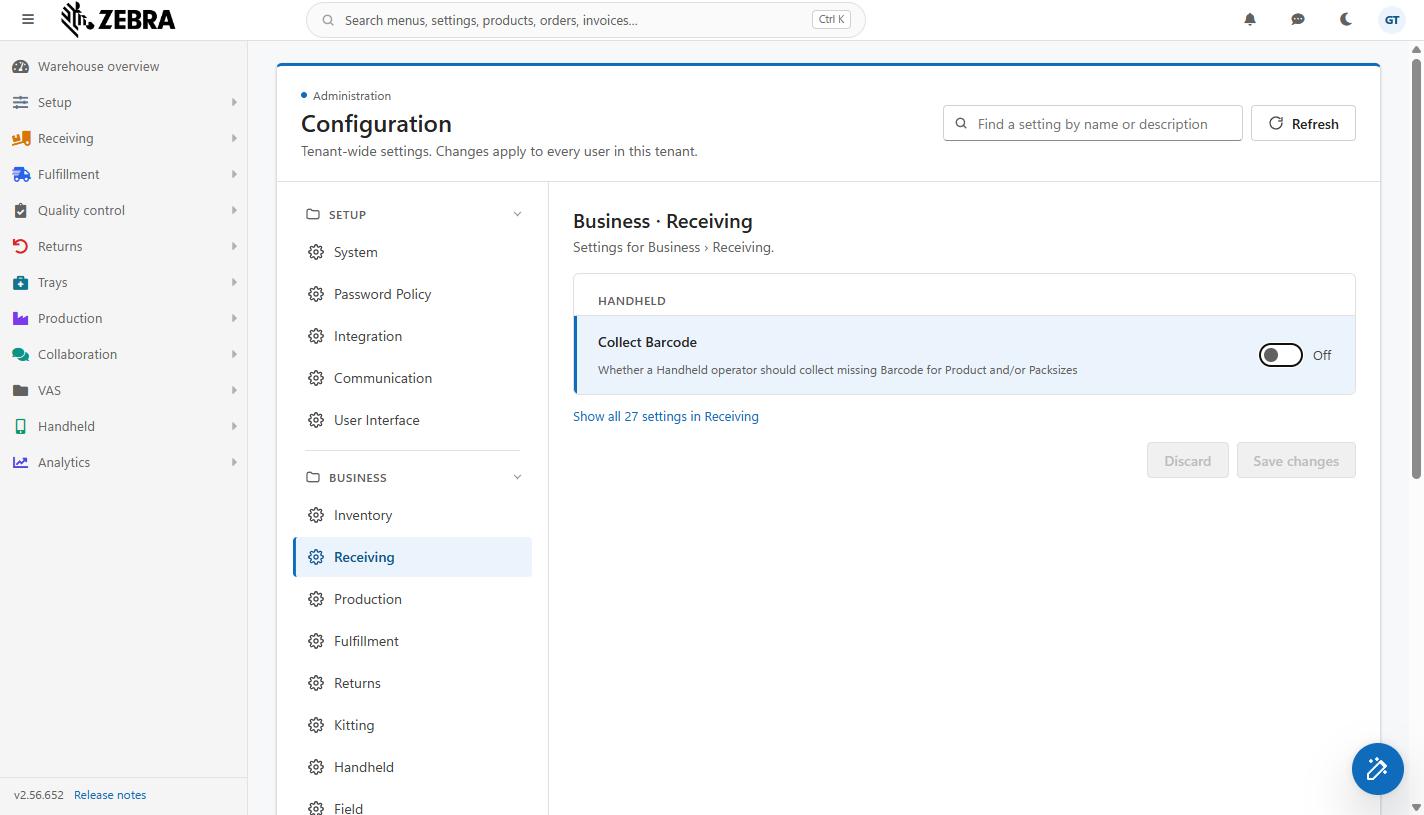
A setting opened from Ctrl+K, highlighted alone at the top of its section, with Show all 27 settings in Receiving under it.
Type a prefix and a colon before your search to look in one group only:
| Prefix | Searches | Example |
| menu: | Menu | menu:waves |
| set: or setting: | Settings (administrators only) | set:packslip |
| product: or sku: | Products | sku:AND-0004 |
| stock: | Inventory | stock:AND-0004 |
| pt:, pick: or order: | Pick tickets | pt:1045 |
| po: | Purchase orders | po:1001 |
| inv: or invoice: | Invoices | inv:0000037 |
| ret: or return: | Returns | ret:12 |
| lpn: | LPNs | lpn:0000123 |
| bin: | Bins | bin:A-01 |
| cust: or customer: | Customers | cust:ACME |
| client: | Clients | client:Balboa |
| vendor: | Vendors | vendor:Global |
| user: | Users | user:maria |
A word before a colon that is not one of these prefixes is searched as typed, so a time such as 12:30 or a code that contains a colon still works.
| Key | What it does |
| Ctrl+K / Cmd+K | Go to the search box from anywhere |
| Up / Down | Move through the results |
| Enter | Open the highlighted result (the first one if none is highlighted). On a setting: save it if you changed it, otherwise open it in Configuration. |
| Ctrl+Enter | Open the result in a new browser tab. On a setting: open it in Configuration in the same tab. |
| Tab | Jump to the next group. On a highlighted setting that can be changed here: move into its value. |
| Shift+Tab | Jump to the previous group |
| Space (inside a setting's value) | Flip a Yes / No switch |
| Escape | Clear the search and close the panel |
| Symptom | Likely cause | What to do |
| Only menu and settings results appear | Fewer than 2 characters typed | Type at least 2 characters to search records. |
| Settings never appear (and there is no Settings chip) | Settings are shown to administrators only | Ask an administrator to make the change. |
| A settings result shows only Open in Configuration | The setting is a password, a multi-line text, an Email body, a zone list or a printer | Click Open in Configuration and change it there. |
| Saving a setting is refused | Only administrators can change settings | Ask an administrator to make the change. |
| A kind of record never appears | Your role cannot open that list | Ask your administrator for access to that screen. |
| An Inventory search finds nothing | Inventory matches the exact SKU only | Type the full SKU, for example stock:AND-0004. |
Was this page helpful?